Use the installed system, radio link, receiver identity checks and enrollment process to turn a frequency-only inquiry into a compatibility decision you can verify.
Reading mapArticle sections9 sections
A housing, a battery, a few buttons, a circuit board and a transmit frequency: an RF remote looks like a simple product. Then a customer asks for a “433 MHz remote.” You supply one, and it will not pair. Two four-button remotes use the same frequency but cannot copy each other. An inexpensive order turns into hours of support.
The missing piece is usually the system around the remote. The customer wants a door to open again, another person to gain access or a lost transmitter to be replaced. The remote is the part of that control system closest to the user. Learn the system first, and frequency, coding, protocol and pairing start to make sense.
Start with the Installed System
Newcomers often start with a specification sheet: frequency, encoder chip, range, button count, battery type, water resistance and copying support. Those details matter, but the first question is simpler: which existing system must this remote join?
Replacing a broken garage-door remote, adding an employee to a parking barrier and upgrading an old roller-door controller are different jobs. They need different evidence, permissions and installation steps. A remote that transmits correctly can still be the wrong product for all three.
The item on the invoice is a transmitter. The result the customer needs is working control of the intended equipment.
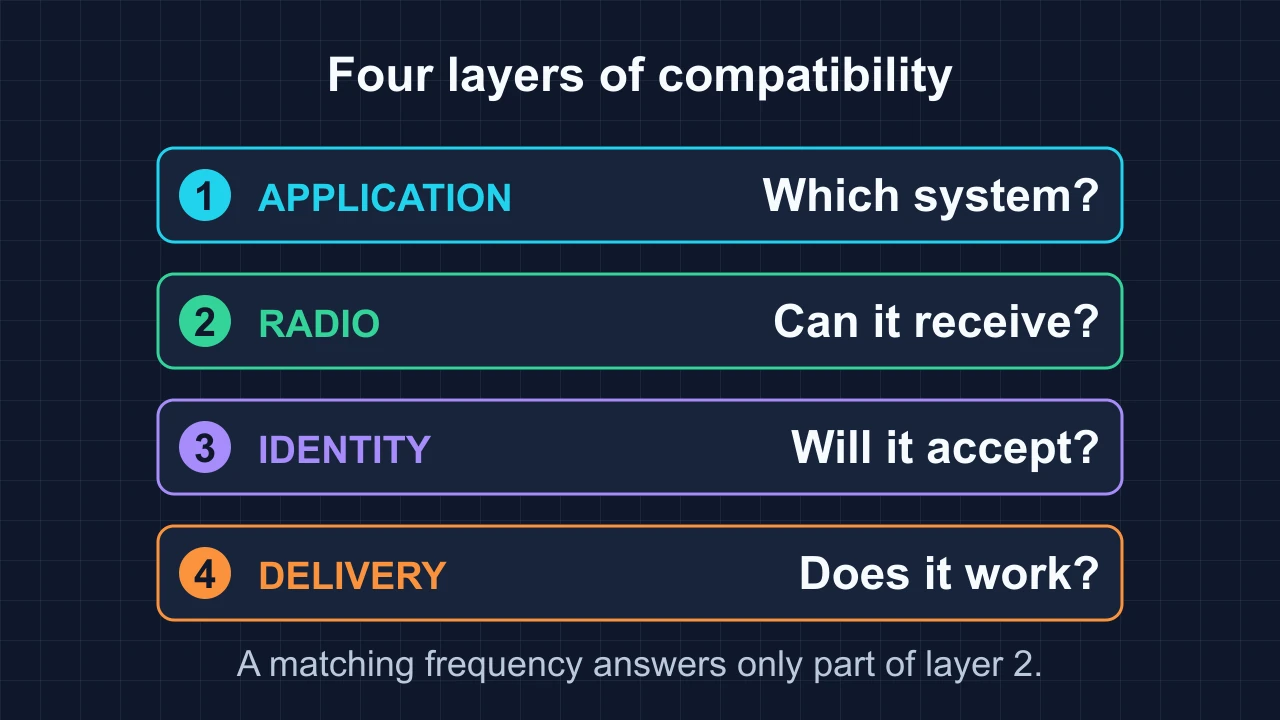
Treat the inquiry as four connected questions. This is a working model for sales and troubleshooting, not a formal communications standard:
- Application: what equipment is controlled, which receiver or controller is installed, and what result does the user need?
- Radio: can the receiver recover this signal under the intended frequency, modulation, timing, range and installation conditions?
- Identity: does the message follow the expected protocol and satisfy the receiver’s address, credential and security checks?
- Delivery: can the customer enroll the remote, map the buttons and demonstrate the required operation?
Why the Same Frequency Is Not Enough
A carrier frequency tells you where a signal is transmitted. It does not tell you how the signal carries data, what the data means or whether the receiver will accept it. “Both are 433.92 MHz” is a useful observation, not a compatibility result.
The radio layer includes modulation. ASK changes signal amplitude; OOK is an ASK form that switches the carrier on and off. FSK carries information by changing frequency around a nominal center. A receiver configured only for one method will not correctly recover the other just because their nominal frequency labels match.
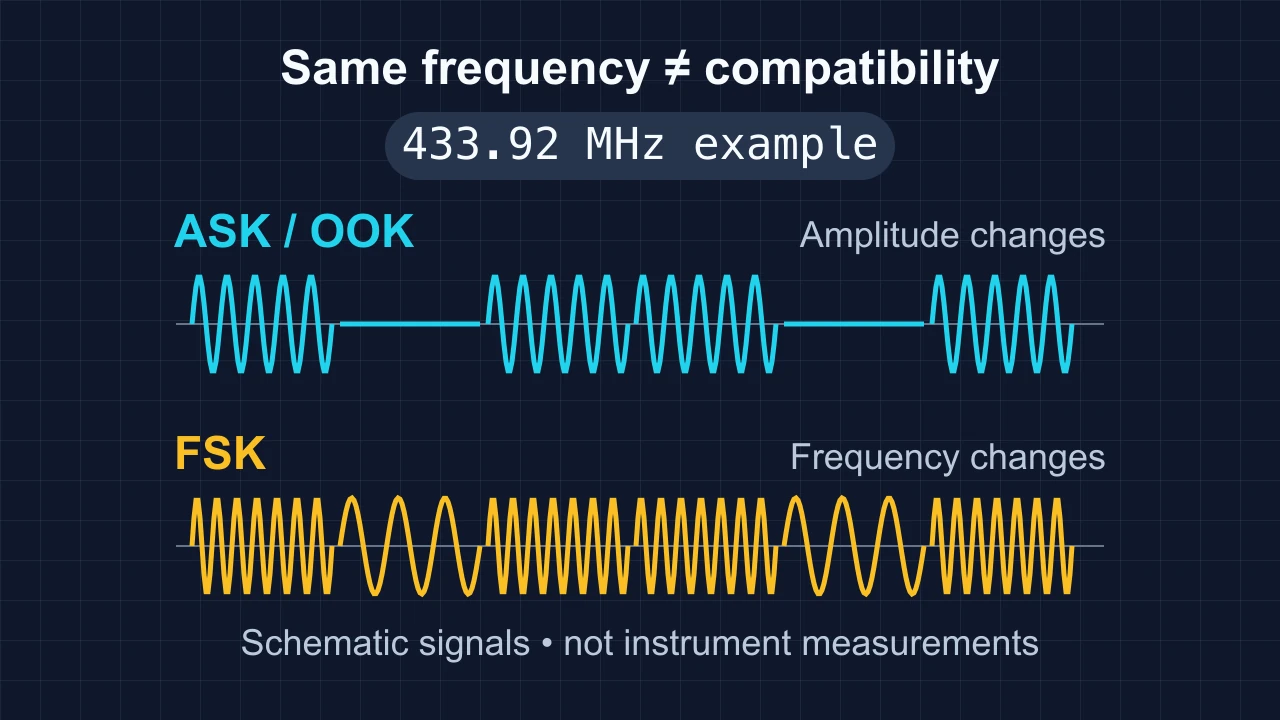
Data rate, pulse timing and receiver bandwidth also matter. Some radios support several modulation modes, but they still need the correct configuration. TI’s CC1101 data sheet provides a concrete example of a configurable radio with separate frequency, modulation and data-rate settings.
Above that, the receiver must understand the packet or pulse format, interpret the button data and accept the transmitter’s identity. Sharing a channel resembles being in the same room: it creates an opportunity to communicate, but it does not supply a shared language or permission to act.
Translate the Customer’s Request into a Job
When a customer asks for a “433 MHz garage remote,” ask what changed and what they want to achieve. The answer determines the next step:
- “The original is lost”: restore control and confirm how the lost remote can be revoked.
- “I need one more”: add an authorized user and check enrollment access and available receiver capacity.
- “Can your copier copy this?”: identify the source system and decide whether copying is supported or receiver enrollment is required.
- “The remote stopped working”: separate the battery, transmitter, receiver and downstream controller before choosing a replacement.
- “I want a universal model”: define the installed models the buyer actually needs to cover.
This turns a catalog question into a control task. It also makes the sample test meaningful: success is the specified button producing the intended action on the identified receiver, not an LED flashing on a copy remote.
Separate Coding from Enrollment
Fixed code, learning code and rolling code are familiar trade terms, but they are not three neatly separated security levels. Fixed or changing message data describes one property. How the receiver enrolls a transmitter describes another.
- Fixed code: the relevant transmitted code stays the same for the same command. Some systems use matching DIP-switch addresses; others use factory-set identities. Static systems without additional protection can be vulnerable to replay.
- Learning: the receiver saves information about an accepted transmitter. It can learn static-code remotes or rolling-code remotes. A Learn or Code button is evidence of a programming interface, not proof of a particular security mechanism.
- Rolling code: part of the message changes, and the receiver checks it against stored security and synchronization state. A stable transmitter identifier may still be present; not every identity field changes on every press.
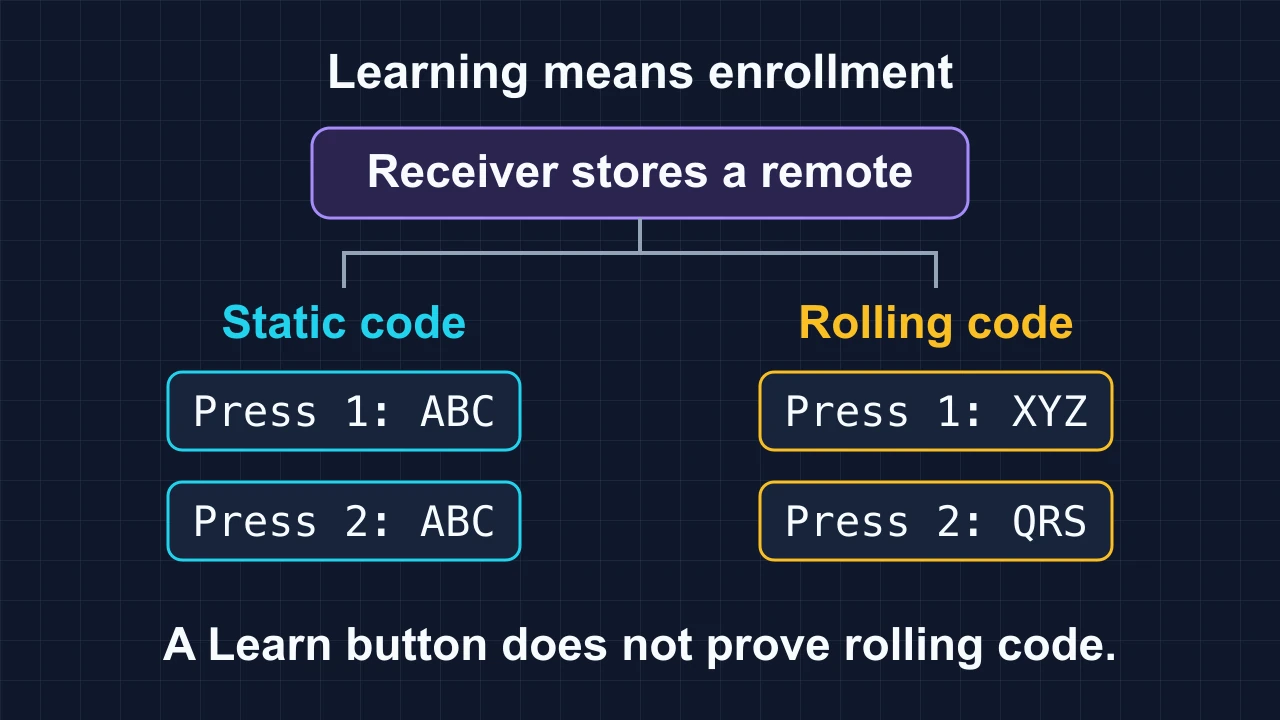
Microchip’s HCS301 documentation illustrates enrollment that stores a transmitter identity, key and synchronization state. Replaying one captured transmission does not provide an independently enrolled, reliable replacement. That is different from saying every rolling-code system is impossible to replace: supported replacements still depend on the exact system and enrollment method.
A useful response is: “Please confirm the receiver model and programming procedure. We can then assess a verified replacement or an appropriate receiver upgrade.” The model and sample result should support the offer. A chip-family name, housing match or security label alone cannot do that.
Use the First Five Minutes to Collect Evidence
Five minutes can route a sample to the right investigation. It cannot establish every protocol detail or guarantee compatibility. Use a consistent intake sequence:
- 1. Record the remote and receiver: model labels, frequency information, button functions, battery type and the current programming instructions. Add clear housing and accessible PCB photos where appropriate.
- 2. Look for address switches, board revisions and chip markings. A DIP-switch bank is a clue; confirm its documented function before assuming it sets a fixed-code address.
- 3. Ask how an additional remote is enrolled: matching switches, a receiver button, a controller menu or an already authorized transmitter. Copying into a remote and enrolling in a receiver are different operations.
- 4. Measure only what the equipment can establish. A frequency reading does not validate modulation, message timing, security credentials or correct button mapping.
- 5. Route the inquiry using confirmed evidence: assess an identified replacement, follow the documented enrollment process, obtain missing receiver information or evaluate an upgrade.
A copier reporting success while the door stays still does not diagnose rolling code. Wrong frequency, timing, protocol, enrollment, receiver state or output mapping can also explain it. Likewise, even a confirmed fixed-code system needs the right encoding and command structure; matching DIP count and button count is not sufficient.
Manufacturer instructions are the reference for pairing. Nice’s SMXI/SMXIS manual, for example, distinguishes memorization modes and specific indication sequences. It is an example of why a generic “press Learn, then press the remote” instruction cannot cover every receiver.
Give “Universal” a Defined Boundary
Universal is attractive to customers and stockists: fewer SKUs, simpler ordering and wider coverage. It becomes a useful claim only when the supported models and conditions are stated. A multi-frequency remote can still support a limited set of protocols, and a multi-protocol remote can still require model-specific enrollment.
Define the exact receiver models or families, supported regional variants, firmware restrictions where relevant, required programming method and button functions. Keep a sample-test record for the combinations actually verified. Certification for a market is a separate requirement; it does not prove that an unrelated receiver accepts the remote.
When the original protocol cannot be supported, a transmitter-and-receiver kit may be worth evaluating. Check controller inputs, output behavior, supply requirements and the installation’s existing functions and interlocks. Adding a receiver changes the system interface; it is not automatically a drop-in solution.
Build a Market Plan from Installed Models
For a market such as Saudi Arabia, start with local installers’ actual inquiries: garage doors, villa gates, shop shutters, warehouse doors or parking barriers. Ask for receiver models, regional variants, photos and programming methods. These are inputs to a market assessment, not evidence that one frequency or a short brand list covers the market.
If an identified installation uses 433.92 MHz, that is a radio requirement for that installation. It does not establish the country’s installed-base share or the complete approval requirements for a new product. Confirm current local radio and equipment requirements for the proposed configuration separately.
Then organize the offering around three different jobs:
- An identified basic replacement: a compatible model with a clear setup procedure for a specific existing system.
- A verified brand-and-model replacement: documented coverage for the installed receiver variant, rather than a brand-wide promise.
- An assessed transmitter-and-receiver upgrade: for installations where keeping the original radio interface is impractical and the controller interface supports the change.
Stock and support can follow the observed demand for those jobs. Price, delivery commitments and available models need real supplier and customer information. They should not be inferred from a country name or frequency label.
Car Keys Add a Separate Authorization Problem
Gate-remote experience transfers well to automotive work in several areas: radio links, model identification, enrollment questions and disciplined sample records. What does not transfer automatically is the complete vehicle security and programming process.
Remote locking and unlocking, immobilizer authorization and passive entry or start may be distinct functions, even when integrated in one key. Working door buttons do not prove that the vehicle will permit starting. NXP’s overview of car-key development describes the integration of remote keyless entry and immobilizer functions without making them the same job.
Begin with the vehicle make, model, year, market variant, key reference and supported programming method. Transponder and credential requirements, tool coverage and authorized access differ by vehicle. OBD programming is one possible route, not a universal procedure. Define which functions need replacement and verify them individually.
Choose Wireless Technology from the Job
Do not put every wireless term in the same category. 433.92 MHz is a frequency; ASK and FSK describe modulation; static and rolling-code behavior describe message and acceptance properties. Bluetooth, Wi-Fi, Zigbee and network stacks cover additional communication rules. LoRa describes a radio technology, while LoRaWAN adds network behavior. Matter is an application-level interoperability standard, not a new radio frequency.
- Phone interaction: BLE can be a useful candidate where supported by the phone and product. It still needs the appropriate application, authorization and control path; a phone does not directly become a conventional sub-GHz transmitter.
- Smart-home integration: choose the required controller ecosystem and device functions first. Zigbee, Thread and Wi-Fi have different network requirements. Matter can run over IP transports such as Thread, Wi-Fi and Ethernet; supported bridges may connect other systems.
- Wide-area monitoring: LoRaWAN, NB-IoT and LTE-M can be candidates for suitable telemetry and management tasks. Evaluate coverage, infrastructure, power, message rate and downlink latency. Long range does not establish suitability for immediate motion control.
- Industrial networking: systems such as WirelessHART, ISA100.11a and Wi-SUN serve different application and network requirements. A technology name alone does not guarantee deterministic timing or a complete machine-control solution.
- Digital vehicle keys: supported implementations can combine BLE, UWB and NFC for different communication and proximity functions. These are parts of a vehicle-access system, not substitutes for vehicle credentials and authorization.
The Matter FAQ explains the distinction between the application standard and its network transports. The LoRa Alliance’s overview shows why device class and receive windows matter for downlink behavior. The CCC Digital Key use cases illustrate BLE/UWB and NFC access paths. Each source describes a particular system; none is a blanket promise about an arbitrary product.
Ask about distance, power source, data and security, then add response time, command confirmation, network availability and behavior when communication fails. These requirements give technology selection a purpose. The longest range or most familiar protocol name is not an answer by itself.
For every remote, ask what it controls, why the receiver accepts it and what the customer needs to achieve.
That habit turns a scattered collection of frequency, chip and housing facts into a usable method. For a compatibility inquiry with Dongguan Fengxian Electronics Technology Co., Ltd., start with the remote and receiver models, the existing programming method and the required outcome. Use the RF question form below to open an email draft and add your identification photos in your email app.

About the Author
Eric Huang
RF Remote Controls & Controllers Specialist
I work with trade buyers on custom RF remote and controller projects, automotive remote requests and aftermarket gate and garage remote sourcing. These guides help you define product requirements and plan sample checks before ordering.
Share your application or original system, target market and question to discuss the next steps.
Keep reading
Related articles
Why a Replacement Remote Will Not Pair
Separate failed enrollment from poor range, then check the receiver variant, code family, programming method and tested replacement model.
Read next RF EngineeringOne Remote, Many Doors: How Shared RF Control Works
Understand how receivers recognize enrolled remotes, map buttons to groups, and manage shared access without confusing capacity with radio reliability.
Read next TroubleshootingWhy a Copy Remote Reports Success but Does Not Work
Separate signal learning, receiver enrollment and range problems before choosing a copy remote, a dedicated replacement or an assessed receiver upgrade.
Read nextDiscuss Your Project or Replacement
Share your application or original system and your question to discuss the next step.
RF questions by email
Ask Eric About Your Remote or Receiver
Describe your remote or receiver, the issue and what you have already tried. Add model details and your country if available.
Opens a draft in your email app. Review it, attach any photos and send your message.